Know which words to check
Every word has a confidence score. Send only the doubtful ones to review, as a spreadsheet, instead of proofreading whole pages.

OCR that runs on your own computer
Glyphwise reads scanned documents, PDFs and phone photos and gives you searchable PDFs, text and data. Every word comes back with its place on the page and a confidence score, so you know exactly which ones to check.
Windows, Linux, macOS No account Works offline

How it works
Real output: an IRS form photographed at an angle in uneven light, read by the model that ships in the download.
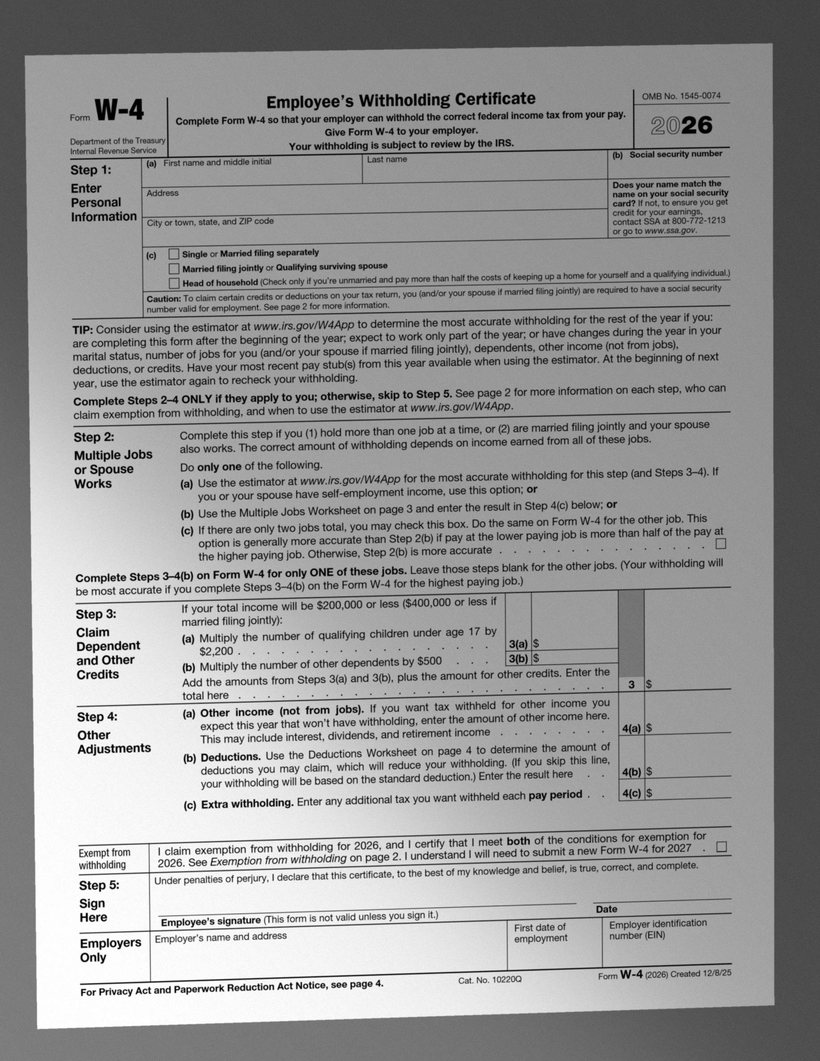
Scans, PDFs, TIFFs or photos. Tilted, sideways and shaded pages are straightened and evened out first.
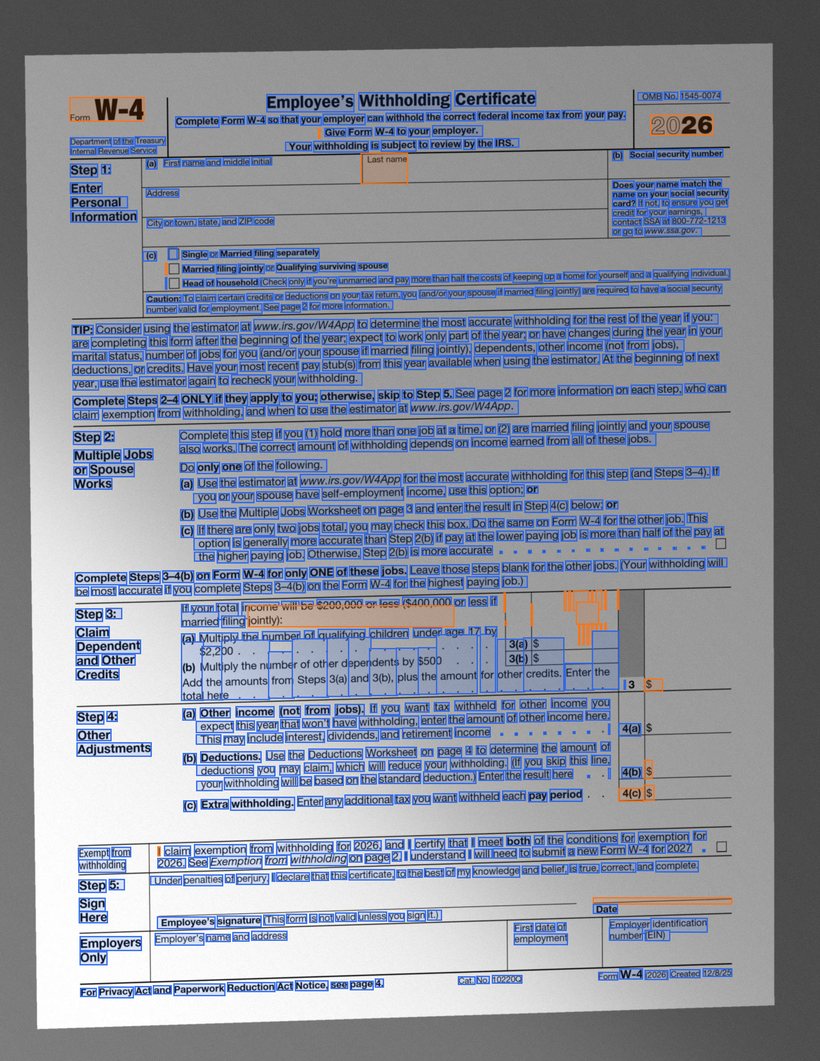
Each word gets a box and a confidence score. Blue means sure; orange means worth a second look.
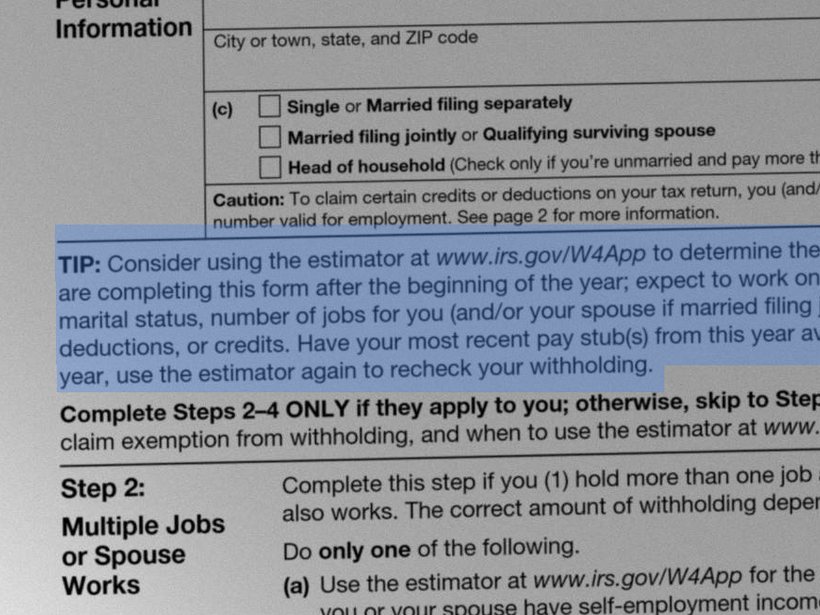
Get a searchable PDF you can select and copy from, or text, JSON, hOCR and ALTO for your systems.
Features
Every word has a confidence score. Send only the doubtful ones to review, as a spreadsheet, instead of proofreading whole pages.
No cloud, no telemetry, no activation server. Contracts, medical records and tax forms stay on your machine, even air-gapped.
Your scan, unchanged, with an invisible text layer: search, select and copy like any digital document.
Columns, tables and form boxes are found and read in order. Tested on IRS forms, NIST reports and the Federal Register.


Each with its own language model that corrects likely misreadings.
Uses every processor core, and an NVIDIA card if you have one. 38 test pages in 13 seconds on a laptop with an NVIDIA card.
A library with ready wrappers, a local HTTP service and a command line.
Formats
PDFs with a text layer are read directly, so born-digital documents come back exact. Scanned pages and phone photos are repaired first: crooked, sideways and upside-down pages are set straight and shadows and speckles are cleaned away.
Measured, not claimed
We test on public-domain government documents, forms, phone photos and handwritten archives the models never saw in training, and run other engines on exactly the same files.
| Test set | Measure | Glyphwise | Tesseract 5.4 | PaddleOCR 3.7 | TrOCR large |
|---|---|---|---|---|---|
| Government documents2,000 lines from 8 held-out documents | character errors | 0.33% | 1.47% | — | —1 |
| Full pages, forms included38 pages: Federal Register, IRS forms, NIST report | words found (F1) | 97.7% | 94.1% | 94.4% | — |
| Same pages, words with a letter or digitleaves out punctuation, dot leaders and form rules | words found (F1) | 98.3% | 97.7% | 98.0% | — |
| Second page set53 pages from 27 other held-out documents | words found (F1) | 97.4% | 94.0% | — | — |
| Phone photos of pagesthe 38 pages photographed at an angle, in uneven light, slightly blurred | words found (F1) | 96.6% | 90.9% | — | — |
| Handwritten manuscriptsBentham papers, 18th–19th century, 424 lines | character errors | 14.0% | 74.6% | — | 12.7% |
| Modern handwriting, phone photosGNHK notes and forms, 300 lines | character errors | 44.9% | 71.1% | — | 32.2% |
| Speedthe 38 pages above, laptop with an NVIDIA GPU | total time | 13 s | 21 s | —2 | — |
Lower is better for errors, higher for words found. Pages rendered at 300 dpi; every engine with its standard English model, run as a separate program on the same files and scored the same way (— = not run on that set). Glyphwise numbers are for the model that ships with the product.
Where Glyphwise leads: printed documents and forms, and phone photos of them. Words found counts every word the page's text layer holds; much of the full-page lead comes from punctuation, dot leaders and form labels the other engines often leave out, so the row with letters and digits only is the closer contest. Where it does not: handwriting. TrOCR, a 560-million-parameter transformer that needs a graphics card, reads modern handwriting markedly better and old manuscripts slightly better; Glyphwise also skipped a few lines it could not read (6 of 424 and 11 of 300), which flatters it a little. The photo copies are generated from the test pages, so their ground truth is exact.
1 TrOCR's printed-text model writes capital letters only, so it is not scored on documents. 2 PaddleOCR ran on the processor only, where it took minutes per page.
Languages
English, French, German, Spanish, Italian, Portuguese and Dutch. Pick one with
--lang, per request in the HTTP service, or in the demo.
| Language | Read with the English model | With its own model | Fewer errors | Lines without an error |
|---|---|---|---|---|
| Englishthe default | — | 0.22% | — | 92% |
French--lang fr · try it | 1.53% | 0.91% | −41% | 64% |
German--lang de · try it | 1.36% | 0.24% | −82% | 87% |
Spanish--lang es · try it | 1.52% | 0.44% | −71% | 80% |
Italian--lang it · try it | 1.02% | 0.64% | −37% | 64% |
Portuguese--lang pt · try it | 2.16% | 0.54% | −75% | 68% |
Dutch--lang nl · try it | 0.86% | 0.15% | −83% | 92% |
Character errors on 500 lines per language from real documents: five EU regulations and directives (data protection, digital services, copyright, services, artificial intelligence), 100 lines from each, published as PDFs in every EU language and rendered at 300 dpi; the PDF's own text is the ground truth. None of these documents was used in training. Source: EUR-Lex, © European Union. Other Latin-alphabet languages are read with the English model.
Three ways to run it
Batch-convert folders: one searchable PDF and text file per scan, processed in parallel. Add --gpu to use an NVIDIA card.
glyphwise models\line.bin scans ^
  --out-dir out --formats pdf,txt
An HTTP service for your document system or scanner workflow. It stays on your network.
curl --data-binary @scan.pdf ^
  "localhost:8080/ocr?format=alto"
Ready wrappers for Python, .NET, Java, Node.js and Go, and a small C API for anything else. See the code.
doc = ocr.read("scan.pdf")
print(doc.text)
For developers
Every word comes back as a typed object with its text, confidence and position; errors arrive as your language's exceptions. One loaded model serves many threads.
from glyphwise import Glyphwise

with Glyphwise("models/line.bin") as ocr:
    doc = ocr.read("scan.pdf", lang="fr")
    for w in doc.words():
        if w.confidence < 0.8:
            print("check:", w.text, w.bbox)
using Glyphwise;

using var ocr = new GlyphwiseOcr("models/line.bin");
Document doc = ocr.Read("scan.pdf", lang: "de");
foreach (var w in doc.Words())
    if (w.Confidence < 0.8)
        Console.WriteLine($"check: {w.Text} {w.BBox}");
import site.glyphwise.*;

try (var ocr = new Glyphwise(Path.of("models/line.bin"))) {
    Document doc = ocr.read(Path.of("scan.pdf"));
    for (var w : doc.words())
        if (w.confidence() < 0.8)
            System.out.println("check: " + w.text());
}
const { Glyphwise } = require("glyphwise");

const ocr = new Glyphwise("models/line.bin");
const doc = ocr.read("scan.pdf", "es");
for (const w of doc.words())
  if (w.confidence < 0.8) console.log("check:", w.text, w.bbox);
ocr.close();
ocr, err := glyphwise.Open("models/line.bin")
if err != nil { log.Fatal(err) }
defer ocr.Close()
doc, _ := ocr.ReadFile("scan.pdf", "it")
for _, w := range doc.Words() {
    if w.Confidence < 0.8 { fmt.Println("check:", w.Text) }
}
Also: plain JSON, hOCR and ALTO output, the C API underneath (include/glyphwise.h),
and examples for each language in the download. Building it into an application is part of the
Developer licence.
Your documents stay yours
Contracts, medical records and tax forms are exactly the documents that should not be uploaded to someone else’s cloud. Glyphwise never connects to the internet.
Pricing
Each licence runs for one year and includes every update released in that year. No automatic renewal. Prices in US dollars, before applicable tax.
30-day refunds · Licence file by email · Works offline
Free trial
glyphwise on a few of your own scans. Without a licence it reads up to 3 pages per run, with every feature switched on.glyphwise.lic next to the glyphwise program and the limit is gone.Windows 10/11 x64, Linux x64 (Ubuntu 22.04 or newer) and macOS 12 or newer (Apple silicon and Intel). See what's new. Each package includes the model, the user guide, the licence agreement and third-party notices.
Questions
English, French, German, Spanish, Italian, Portuguese and Dutch, each with its own language model that corrects likely misreadings (measured here). Other languages written in the Latin alphabet are read with the English model, which works but makes more mistakes on accented words. Non-Latin scripts (Greek, Cyrillic, Arabic, Chinese, ...) are not supported.
No. It runs on any modern x64 processor and uses all its cores. An NVIDIA card (or any OpenCL card) makes large batches faster; the results are identical either way.
Much better than engines built only for print, but handwriting is still hard: on 18th-century manuscripts about one character in seven is wrong, and casual modern handwriting photographed on a phone is harder still. Use the confidence scores and the review list to find the words to check.
The software goes back to evaluation mode (3 pages per run) until you renew. Files you already converted are yours and are not affected.
Yes. If Glyphwise does not work for you, ask for a refund within 30 days of purchase. See the terms of sale.
Yes. There are packages for Windows (x64), Linux (x64) and macOS (one build for Apple silicon and Intel), with the same features and the same licence file. GPU acceleration uses CUDA or OpenCL on Windows and Linux; on a Mac recognition runs on the CPU.
Yes. Pages photographed at an angle are found and flattened, sideways and upside-down photos are turned upright, and shadows are evened out. For best results photograph the whole page, flat, in even light, against a darker background.
The user guide covers installation, the licence file, the command line, the HTTP service and the C API. It is also in the download.
Download the free trial, or try it in your browser right now.